
Music, the Glue That Holds the Universe Together
I love music, do you love music? Of course you do, you’re reading a review about a compact keyboard. Music is the magic dust that keeps us all going, the mysterious intangible 5th element that binds everything together. It fuels our workouts, keeps us locked in through work and play day in and day out and at the end of the day it lulls us to sleep. Our playlists are fundamental indicators of our personalities and can serve as an emotional toolbox to help us through the tough times and elevate us through the good. While some of us put more stock in its value than others, all of us live lives side by side with music, the radio playing in every store, the tunes on TV, it’s everywhere!
After a while of building a huge playlist of “liked” songs, I started to wonder how so many people were making so much music. Spotify has over 100 million songs in its library according to their own metrics and YouTube Music has kept pace with another 100 million. Sure, there’s a lot of crossover, but that’s a seriously crazy amount of music! I started looking into the world of at-home music production and quickly found myself fascinated by the tools of the trade. I learned about the wide world of microphones, Digital Audio Workstations (DAWs) where solo artists could record and mix their own tracks and much to my wallet’s chagrin, audio peripherals.
I am a huge sucker for accessories. Half of my hobbies have become an excuse to collect and master all the cool stuff that comes with them. Gaming comes with controllers, headsets, consoles and screens. Crafting comes with a mountain of neat little tools and materials. Even cigars, my guilty pleasure, come with all sorts of neat stuff like cutters, lighters and humidors. Digital audio production is no different, in fact it may be one of the worst offenders! There is a huge world of audio peripherals like digital synths, instrument pedals and keyboards. Of course, seeing all of this only made me want to play around in the space even more and before I knew it, I had become a hobby sound designer! Breaking through the outer layer of this hobby is complex because the related tools and programs don’t work anything like others one might be used to.
It’s a Controller, Not a Keyboard
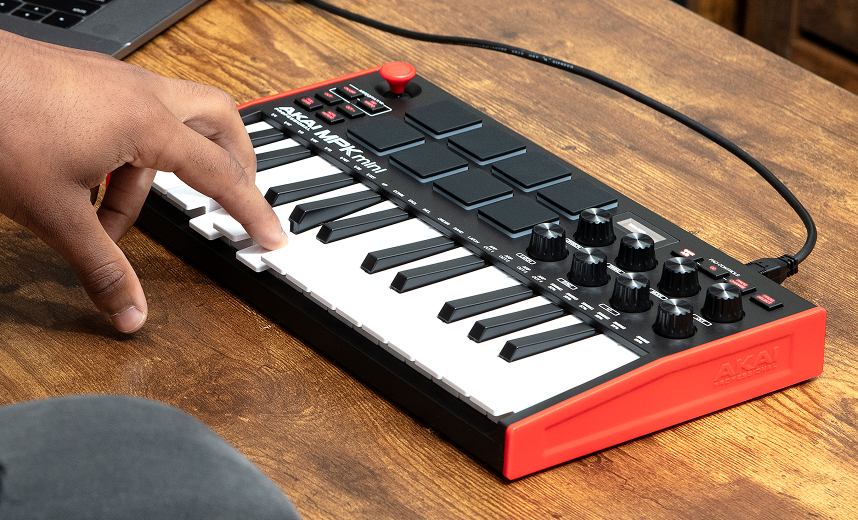
As an example of this, and as a way to get us all fired up about the wild world of audio production, let’s talk about the Akai MPK Mini MK3 MIDI Keyboard. As this is a very recently acquired hobby of mine I can point to this as one of my initial misconceptions that presented me with a pretty serious learning curve. The MPK Mini is not a keyboard. I thought I was buying a keyboard, but no, I was buying a controller. When you are learning how to use a DAW (Digital Audio Workstation) one of the first questions you are confronted with is “how on earth do I make new sounds in this program?” There are all sorts of sound packs to be found and installed and most programs you can work in like Reaper, BandLab and Logic have a little on-screen keyboard to play with, but I wanted a keyboard I could bang on with my hands! I did a little reading and found that a lot of people were recommending the Akai Mini series so I went ahead and got the most popular one, the MPK Mini! It arrived and I excitedly plugged it in and turned on my program (Reaper, in my case, because it just sounds so cool). I quickly learned that it is not so simple as plugging it in and playing notes as this thing doesn’t make its own sounds, it controls the sounds you point it at through the DAW. Is that confusing? Yes. Did that annoy me? Heck yeah. Was I deterred from my quest to become the next big thing in synth-wave music? Not in the slightest.
The most important takeaway here is this; this is not a keyboard, it is a controller. Just like a video game controller, the buttons do different things depending on the context of the software it is interacting with!
Tech Breakdown
Now that we understand what we’re working with, let’s look at all the great stuff this thing has built into it.
Keyboard
- 25 mini keys (2 octaves)
- Velocity-sensitive synth-action keys (meaning the sound changes based on how hard you mash the keys)
- Gen 2 keybed for improved playability (the inner workings under the keys are new and fairly advanced)
Drum Pads
- 8 backlit velocity sensitive MPC-style performance pads
- 2 pad banks (16 assignable sounds total by switching the function of the pads))
Knobs / Controls
- 8 assignable endless rotary knobs
- Used for controlling:
- volume
- filters
- plugin parameters
- automation
- Used for controlling:
Pitch & Modulation Control
- 4-way thumbstick joystick
- Controls:
- pitch bend
- modulation
- Controls:
This replaces traditional pitch/mod wheels for compactness.
Display
- An adorable little OLED screen
- Shows:
- parameter values
- preset names
- knob adjustments
The USB Type-B connection provides power and connectivity and the pedal jack lets you connect one pedal.
A Beginner Software Bundle to Get You Started
So if you jumped the gun and bought this thinking it was just a keyboard and realized you had made a serious error, worry not, it comes with some great freebies to get you started!
First and foremost, it actually comes with access to a good beginner DAW, MPC Beats. This means that even if you didn’t start this journey by trying to figure out a Digital Audio Workstation, it gives you one to start playing around with!
Once you get in there you’ll quickly find that you need to assign a sound to the keyboard, and it gives you three pretty nice sounds to work with.
- Hybrid 3 (a synth that lets you mess with parameters to change the sound profile)
- Mini Grand (a basic piano preset)
- Velvet (a smooooth little electric piano)
These little bonuses really helped me figure out what I was doing and got me to the point where I was making actual sounds with this thing fast enough to stop me from getting confused and putting this thing back in the box. I highly recommend playing around with the included software.
What it’s Like to Use the MPK Mini
This thing is pretty small, which means that even on my fairly cluttered desk I was able to find a spot for it. If I was the sort of person to travel with my hobbies, the MPK Mini also fits easily into any typical bag. At 12.5 x 7 x 1.7 inches, it would be harder to find a bag it won’t fit in, really.
Using this in actual music production is a challenge at first, as the many features take some time to learn. If you’re new to audio production, this controller will absolutely take some getting used to. Once you get it all figured out, though, it is a joy to work with. The drum pads make beats a ton of fun to make, the smaller keyboard makes it hard to play full songs with without pausing and adjusting settings so it’s not like a regular full-size keyboard. Plan on using the keys to play segments of your tune at a time, adding those segments to a timeline and adjusting the octaves to play higher or lower sections. The knobs and arpeggiator make adjustments to your synth and loops a breeze and the little tone-bending joystick is just fun to mess with.
Who This is For
Like I said earlier, this isn’t a regular keyboard. I can easily imagine someone seeing the MPK Mini and thinking they are getting a neat keyboard with lots of fun extra sounds and being extremely confused upon plugging this thing in. It’s not for someone who just wants to bang out a tun or play a little keyboard for un, it is a tool for music production at a higher level than most casual players. This is for someone who wants to start learning the basics of digital audio, or for someone who already knows what they are doing. This isn’t a toy for kids, no matter how small and cute it looks.
This is best suited for:
- beginner producers
- bedroom studios
- traveling musicians
- electronic music producers
- beat makers.
It’s less ideal for:
- professional keyboardists
- large studio control setups.
Final Thoughts
The Akain MPK Mini is a great little MIDO controller for beginners and small scale producers alike. It’s a challenge to learn, but it’s very rewarding once you figure it out. If you’re easily frustrated by new tech and/or software, keep looking, this ain’t for you. If you’re the kind of person who likes to figure out new things and loves the extra stuff that comes with your hobbies, this is for you. If you already produce audio and need something portable, this is for you. I’m still fairly new to all of this and I’m having a lot of fun with it, so take a chance and plug it in! For $99.00 it’s a steal.
Bio: Every since George was disappointed with a toy that did match up to the advertising, he became a tireless advocate for consumers. He’ll review anything that folks have to spend their hard-earned dollars on. George is grateful that he gets to use his skills as a writer and an artist to help connect with consumers and help them make the best decisions possible.
This article is for informational purposes only and reflects the author’s independent opinion. Product features, specifications, pricing, and availability may change without notice. Readers should verify details directly with the manufacturer or retailer before making a purchase decision.