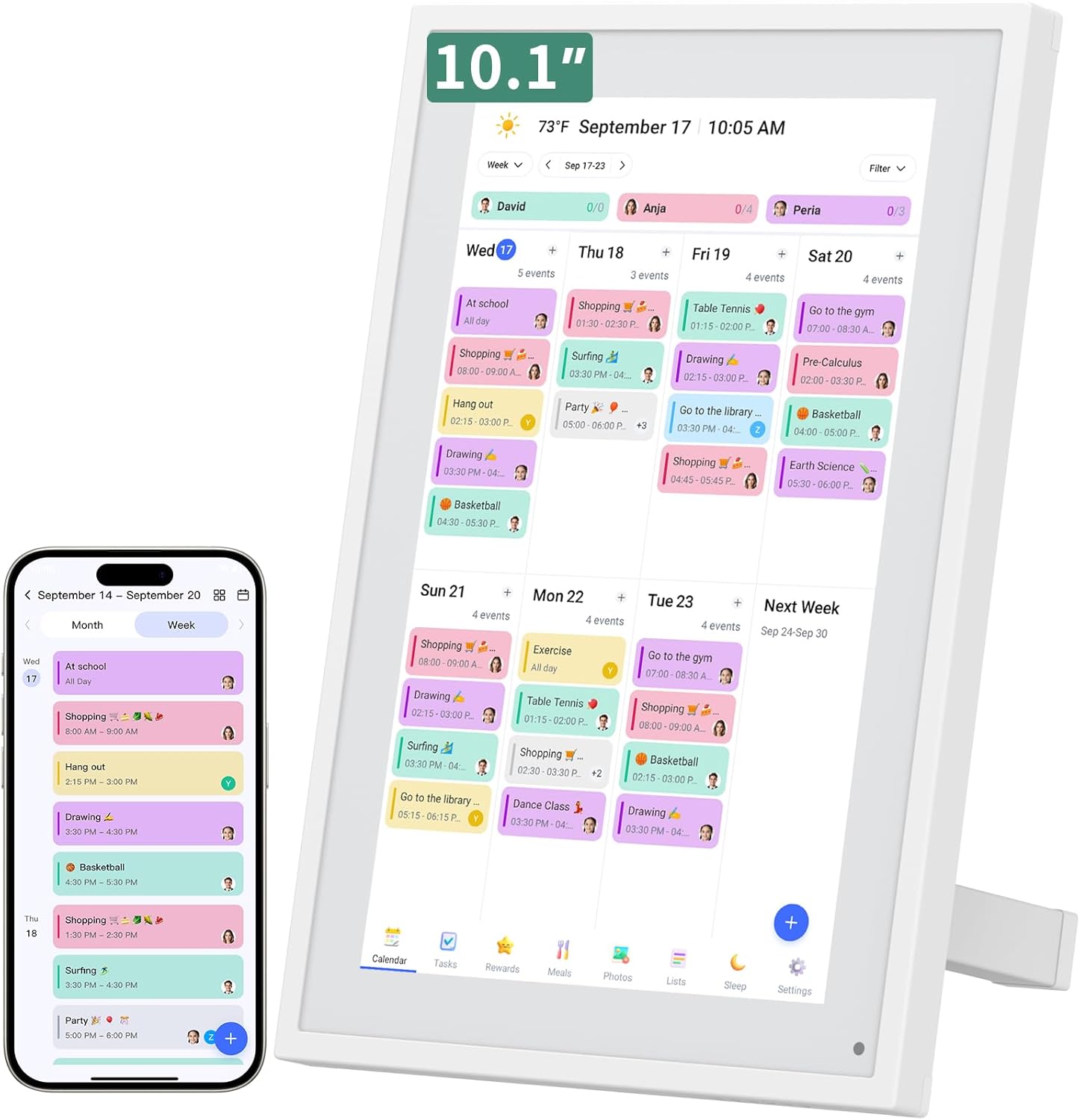

I recently received the most thoughtful birthday gift that will help me manage my busy life.
It was a LiviNGPAi Smart Digital Calendar and with the abundance of hosted events at our home, work obligations, church functions, family celebrations, and travel plans … it’s exactly what I needed to stay organized and keep my sanity.
Sure, we have a calendar on our cell phones. But, if I had a dime for every time I had to remind someone about something scheduled, I’d be rich. A digital calendar is great for all ages, even the youngest of family members can keep track of sports, school projects, holidays, and dreaded chores.
Features That I Appreciate
Let me explain why I like my LiviNGPAi Smart Digital Calendar. I look at this tablet-type of calendar as being a “smarter” version of a typical wall calendar. Let’s face it, we select paper wall calendars because we like the high glossy photos of our favorite dogs, cats, flowers, butterflies, and cars. But you must admit, manually handwriting multiple events in the tiny “square” space allotted for each day on a standard paper calendar is not adequate.
my LiviNGPAi Smart Digital Calendar let’s me type in all my scheduled events and see it at a glance on the tablet calendar. If an event gets cancelled, I don’t have to scribble over it, I can simply delete the event. On some days we have 7 to 10 events listed whether birthday reminders, chores, work meetings, MD appointments, or sporting events. Nothing gets missed!
While you have the option of hanging the LiviNGPAi Smart Digital Calendar on a wall (mount included), we choose to rest it on the tablet stand (included) right on the kitchen island. That way, it forces us to glance at it every chance we get. It conveniently mounts either horizontally or vertically, depending on how you want to view the display. If you prefer to display it in a bedroom, it has a convenient sleep mode that automatically dims the screen display at night.
How Does the LiviNGPAi Smart Digital Calendar Work?
The LiviNGPAi Smart Digital Calendar is a touchscreen tablet design. There is an app, eCalendar, that you use to input the information and it appears on the tablet calendar. The good part about that is that you can continually add, change, or delete scheduled events wherever you are because you can access the digital calendar displayed in your home from the eCalendar app on your cell phone. You certainly can’t do that with a paper wall calendar hanging on your kitchen wall
Even better, this digital calendar is compatible with Google, iCloud, Outlook, Cozi, and Yahoo calendars. And speaking of compatibility with the LiviNGPAi Smart Digital Calendar, let’s talk about set up.
Here’s what you’ll find inside the box:
:: Digital calendar tablet
:: Foldable tablet stand
:: Wall mount and hardware
:: Electric power cord
:: User manual
:: Warranty card
Here’s how easy it is to set up the digital calendar:
<1> Attach the power cord and plug the tablet into an outlet
<2> The welcome screen appears on the display
<3> Connect the tablet to the WIFI
<4> Select your time zone
<5> Next, you need to install the digital eCalendar app on your phone
<6> Simply scan the QR code on the tablet
<7> Download the app on your phone
<8> Open the app
<9> Create an account so you can access your digital calendar
<10> Activate the calendar frame by naming your calendar
<11> The calendar will now sync on your phone. (From the app, we easily synced to our Google account)
<12> Select “events” and start adding your events to the calendar from the app
The data you input on the app is automatically displayed on the digital calendar. Best yet, there’s 24-hour online customer service for assisting users with any needs or problems that are encountered.
It’s Much More Than Just a Calendar!
Those are the basics. Now let’s talk about the most exciting ways to use it. The Livingpai Digital Calendar allows you to add family members, synchronize calendars, and even assign tasks with just one click. It’s a great way to “share chores” with others, so everyone knows what has to be done and when.
You can also upload and sync photos directly from your mobile device, assign color coding to different family members or event types, and make updates that automatically show up in real time across all devices.
And, as I embarrassingly reveal my obsession with the weather, this digital calendar provides automatic weather updates thanks to the auto-location detection.
Manage Hectic Schedules
If you love to use colorful highlighters to emphasize important dates and information, you’ll love the fact that this Livingpai Digital Calendar allows you to use color-coding for each user, event type, reminders, and even chore lists. At a glance, you can recognize and track appointments, work schedules, social events, tasks, meal plans, birthdays, and more.
I prefer the display option that shows a week at a glance, but you can also view just the days or the whole month view. This digital calendar makes it so easy to stay on track and see what’s happening in the days to come.
Smart Reminders
Since using a digital calendar, I have never missed an appointment thanks to the smart reminder feature. I think maybe because it’s a visual reminder, so I am continually staying on track. Reminders don’t need to just be about places you need to go or events to attend. They can be simple reminders to take your daily vitamins or medications, make phone calls, replace the water or HVAC filter, send a birthday card, or mail payment for a bill.
No matter how organized we all think we are, it’s nice to have an assistant like the Livingpai Digital Calendar to provide a gentle nudge to remember something every now and then.
Meal Planning
I can’t say that I’ve been diligent with the meal planning feature of the digital calendar but I have used it for pre-planning special menus for holidays, birthdays, anniversaries, and other special dinner parties.
However, I can foresee that using the weekly meal plan feature could help greatly when following a healthy eating plan. It can reduce the stress of continually questioning, “what to eat” and help you maintain a consistent plan to reach your goals.
Interactive Chore Chart For the Young and Young at Heart
No one of any age enjoys doing chores. So, having a digital calendar that reminds me to do a chore has been a help. Instead of doing all of my house chores in one day, I like to break up the chores by room. For example, if you have 7 rooms in your home, tackle cleaning/organizing one room each day. You can set up that schedule in the digital calendar to keep you on track. And, if you miss a day, simply delete the chore and move it to another day.
Parents with young children will LOVE the “Rewards” tab on the LiviNGPAi Smart Digital Calendar to monitor children’s chores. It’s a great way to build good habits by assigning chores and encouraging independence. Parents can motivate their children through personalized chore tasks that offer a rewards system for a job well done. It’s an easy way to make youngsters feel a sense of achievement and accomplishment. Note: The optional premium Plus Plan is necessary for the stars and rewards program.
Stay Connected from Anywhere
Setting up reminders, events, and chores on the LiviNGPAi Smart Digital Calendar is easy, and you can do it right from your cell phone via the eCalendar app or directly on the device’s screen. This digital family calendar includes “Calendars, Tasks, and Lists” that can be a useful tool for the whole family, plus access to the touchscreen eCalendar app.
Screen Size Allows For Easy Viewing
On a traditional wall calendar, I always had a hard time reading the small handwritten words, not to mention sloppy, rushed handwriting. The digital calendar solves that problem with a screen that’s big and bright enough for my aging eyes to see. And I can even enlarge the calendar view.
Product Specifications of the LiviNGPAi Smart Digital Calendar
:: Cost: $159.99 on Amazon.com
:: Color: White
:: Screen size: 10.1″
:: Material: Metal, Plastic
:: Overall Dimensions: 8″ W x 1″ H
LiviNGPAi Smart Digital Calendar: The Gift That I Now Can’t Do Without
Paper calendars are good for one year or maybe up to 18 months but once completed, in the trash it goes. The LiviNGPAi Smart Digital Calendar is designed for many years to come. I love that a digital calendar continues, so I can input special plans in the calendar for future events in the years to come.
This digital calendar was easy to set up. And using it (like adding, editing and deleting events) is effortless. The chore reminders are helpful and appreciated. I love how easily it synced with my Google Calendar. It’s a great electronic calendar with so many amazing features, a wonderful assistant for my household. The display is bright, easy to view, touchscreen works well, and syncing our calendars was a breeze.