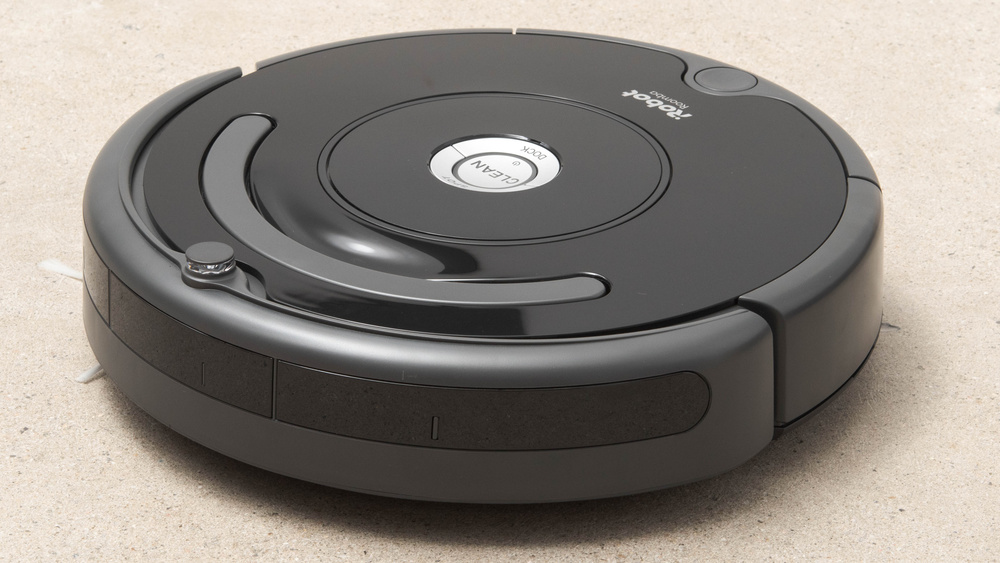

We’ve been using our Roomba vacuum and mop for a couple months and we love it. It feels like we upgraded our whole routine. After living with one, what stands out most isn’t one specific feature. It’s the way all the pieces work together: the dependable vacuuming, the genuinely useful mopping, the smart navigation, and the iRobot app that turns “clean the house” into a few taps or a quick voice command.
Mostly “Set it and forget it”
At its best, a robot vacuum/mop should fade into the background. You shouldn’t have to babysit it, rescue it constantly, or redo the work it claims it finished. That’s where a Roomba combo-style setup shines. It’s built to do the everyday maintenance cleaning that makes the biggest difference: dust, crumbs, pet hair, and that slightly gritty “where did this come from?” debris that accumulates near entryways and kitchens. Then, once the loose stuff is handled, it follow up with mopping to take care of the thin film that can build up on hard floors, especially in high-traffic areas.
If you have a home with mixed surfaces such as tile or hardwood in the kitchen and living areas, carpet in bedrooms, rugs scattered around, the combo approach is particularly convenient. Instead of swapping between separate machines, you get one device that can handle multiple tasks in a single routine.
I do recommend being home while it does it’s work as sometimes it can get stuck and needs help, particularly if it catches on a wire. See more helpful tips in the “Tips” section below.
Our model has a self-emptying dust bin, so you don’t ever need to clean it out, just change the dust collection bag occasionally. I highly recommend getting a model with this feature.
Vacuuming performance that feels practical
Roombas have a reputation for being good at the basics: consistent suction, strong pickup on hard floors, and especially solid performance with pet hair. We notice it works best in the places that get dirty fastest:
- Entryways: tracked-in grit that you can feel underfoot
- Kitchen zones: crumbs and bits around counters and dining areas
- Living spaces: dust and lint that collect along edges and under furniture
- Pet zones: hair tumbleweeds near beds, bowls, and favorite nap spots
Another thing you appreciate over time is how a Roomba approaches edges and corners. No robot is perfect in tight corners, but the combination of edge-cleaning behavior and repeated passes in high-traffic areas helps keep floors looking maintained.
Mopping that’s actually worth using
Robot mopping has improved a lot, and when it’s done well, it’s not just a token add-on. The mopping function on Roomba models with mopping capabilities is ideal for everyday upkeep: light spills, footprints, kitchen smudges, and the dulling layer of dust that damp mopping removes better than vacuuming alone.
It’s not meant to replace a deep scrub of grout or sticky, dried-on messes that need elbow grease. But for keeping hard floors consistently fresh, it’s surprisingly satisfying.
The iRobot app is the real secret sauce
The Roomba itself does the physical work, but the iRobot Home app is what makes the experience feel modern and effortless. Instead of wrestling with buttons or guessing what the robot will do, you get a clean interface that lets you:
- Start or stop cleaning from anywhere
- Monitor it’s progress as it cleans
- Schedule cleanings by day/time
- Choose cleaning preferences like suction strength or mopping options
- Send it to specific areas instead of the whole house
- Create routines such as vacuum everywhere, then mop the kitchen
- View maps and coverage history to see where it cleaned and when
- Integrate with apps such as Alexa and Siri so you can control the Roomba with voice commands
It’s the difference between a robot that feels like a toy and a robot that feels like a household system. Once you set up a couple of routine, you stop thinking about cleaning as a chore you must initiate. It becomes a background habit your home just does.
Mapping your house: the step-by-step experience
One of the most impressive parts of owning a Roomba with smart navigation is watching it learn your home. Mapping is where the robot initially learns your home and the process is straightforward. Here’s what mappinglooks like:
- Initial setup in the app
You connect the Roomba to Wi-Fi, add it to your iRobot account, and follow prompts to get it ready. The app will guide you through basics like charging, placing the dock, and ensuring the robot has enough space to navigate.
- Prep your floors for a “mapping run”
You don’t have to make the house perfect, but a little prep helps:
- Pick up loose cables, small toys, or anything that could snag
- Tuck in dangling curtains or fringe if they’re very low
- Clear obvious clutter in tight hallways
- If you have delicate items on the floor, move them temporarily
The goal is to give the Roomba a clean first impression so the map it creates reflects your actual layout, not obstacles that won’t always be there.
Run a dedicated mapping/learning cycle
Many models allow a mapping run that focuses on exploration rather than heavy cleaning. During this run, the Roomba travels methodically, learning walls, furniture outlines, transitions between rooms, and the general shape of your space.
Let it complete the run or a couple of runs
Depending on your home’s size and layout, mapping can take more than one pass to become accurate. If it doesn’t perfectly identify every room the first time, that’s normal. With each run, the map becomes more detailed and reliable.
Label rooms and create zones
Once a map appears in the app, you can name rooms like “Kitchen,” “Hallway,” “Living Room,” and “Bedroom.” This is where the magic happens: you can now tell the Roomba to clean just the kitchen, or just the hallway, instead of doing the entire home every time.
Refine over time
As you run the Roomba regularly, the map often improves. If you rearrange furniture or move into a new space, you can update the map with additional runs. The app turns mapping into something you adjust once in a while, not something you constantly manage.
The small quality-of-life wins add up
The longer you own a Roomba with vacuum and mopping, the more you notice the benefits. Floors look consistently better with less effort. Dust bunnies don’t get a chance to form. You don’t have to psych yourself up to clean because the maintenance is always happening. It’s especially helpful if you have:
- Pets: hair and tracked-in dirt)
- Kids: crumbs, craft debris, constant traffic
- A busy schedule:(you want clean floors without spending your weekends on them
- Allergies: less dust and debris lingering on floors
Even if you still do an occasional deep-clean, you’ll probably do it less often and it will feel easier because you’re starting from a cleaner baseline.
A balanced, honest expectation
A Roomba with vacuuming and mopping is not a replacement for every kind of cleaning. It won’t magically erase dried syrup that’s been stuck to tile for a week. It won’t detail-clean corners the way you can with a cloth. But if you think of it as an everyday floor maintenance system, it’s genuinely excellent.
It’s the kind of purchase that changes your relationship with cleaning. Instead of cleaning floors only when they look bad, you keep them consistently good. And that difference, more than any technical spec, is what makes it feel like a worthwhile upgrade.
Tips
- Clear up any wires before you do a cleaning run. We find that is where it can get stuck the most
- Move any extraneous items from the floor, like boxes, toys, etc. Leave as much room as you can for the Roomba to clean
- Only do a cleaning run while you’re home, as the Roomba can sometimes get stuck and need help
- Put the home base in a place where the Roomba can easily move to and from
Final take
If you want a single device that can vacuum and mop your floors, learn your home’s layout, and let you control everything through a well-designed app, a Roomba with mopping capabilities is an easy recommendation. The vacuuming keeps daily debris under control, the mopping adds that extra layer of freshness, and the iRobot app turns the whole thing into a simple, repeatable routine. Once your map is built and your schedules are set, it stops feeling like using a robot, It feels like your home quietly takes care of itself.