
The tribes of PC and Mac have been at war since personal computers were first introduced to the world. PC users wave the banner of flexible hardware modding while Mac users boast high initial specs and solid long lasting build quality.
PC brags about broad gaming possibilities and practically endless apps while Mac brings carefully curated program libraries and Mac-only high-end creative software. The pros and cons go on and on and each passing year, the camps become more firmly entrenched in their positions. It is the goal of these reviews to give clear guidance on everything from tech to yard tools, but in some categories the long-standing rivalries between categorical giants must be observed (just wait until we start pitting DeWalt and Milwaukee tools against each other!) So let’s start with Apple and take a look at their flagship Mac Laptop, MacBook Pro.
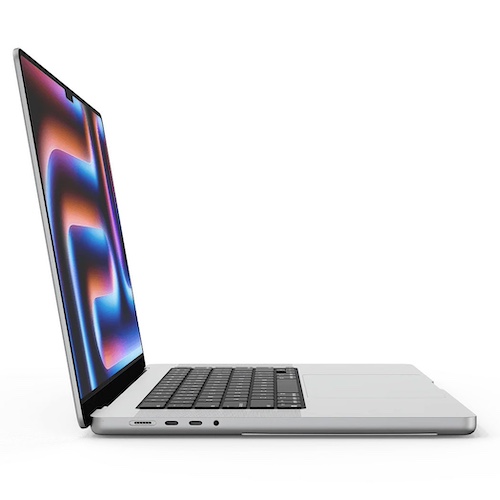
The 16-inch MacBook Pro M4 is not designed to impress casual users. If your daily tasks revolve around documents, email, and web browsing, this machine is more than you need. If your workflow includes multi-layer 4K timelines, 3D animation previews, or large Logic Pro sessions, this laptop begins to make practical sense.
The high price point of $2499 at base specs should also be part of the decision. The real question is whether the performance gains meaningfully improve your workflow, or whether you are paying for power you rarely use. After extended use in video editing, motion graphics, and music production, the difference is not subtle. For me, it was worth it.
Performance That Changes How You Work
The M4 Pro configuration delivers substantial CPU and GPU performance, along with higher unified memory bandwidth. Instead of separating memory between processor and graphics, everything draws from one shared pool (See “Unified” memory. Pretty neat, huh?)
If you are working in video this is a big win as it allows you, in most cases, to work with high quality clips directly on your timeline instead of having to pre-render to see how your edits look. For audio production this means being able to run multiple samples at once while recording audio. For digital artists this means having all your programs open at once without a huge slowdown.
I find that in Final Cut Pro, color-graded 4K footage with layered graphics exports 60-70% faster than on older Intel systems. In After Effects, 3D layers and motion-heavy compositions render and play back without constant interruptions. In Logic Pro, large sessions with dozens of tracks and plug-ins run cleanly without buffer spikes. That stability changes decision-making. You spend less time waiting and less time simplifying ideas to protect performance.
Sustained Power And Heat
I’ve always felt that what matters in creative work is sustained performance. Rendering, encoding, compositing, and audio mixing often last for extended sessions. The 16-inch chassis allows better thermal management than smaller models but something to consider is the heat that will build after long use in an aluminum case. Anyone who has worked with MacBooks in the past can tell you how easy it is to overheat your lap while working off a desk.
Under heavy load, performance remains stable rather than gradually declining. For professionals who work in longer production cycles, this consistency is often more important than peak speed.
Display Quality That Supports Real Creative Work
The 16.2-inch Liquid Retina XDR display runs at 3456 by 2234 resolution with ProMotion up to 120Hz. Scrolling and timeline scrubbing feel smooth immediately if you are coming from a 60Hz display. For editors and designers, this responsiveness reduces visual friction.
Color accuracy and brightness are where the panel stands out. With P3 wide color support and strong HDR brightness capability, it is viable for serious creative tasks. For many workflows, it reduces reliance on an external monitor when working remotely.
There is mild blooming associated with mini-LED backlighting in high-contrast scenes. In everyday editing and design work, it is rarely distracting. For mobile creatives, this display is a legitimate production tool. One thing to consider with a display like this is the simple fact that it is likely “better” than most consumer displays, which means what you see and export won’t look nearly as good once it hits the average viewer’s screen. Keeping a lower-end display handy for previewing your work is a good idea in general.
Audio That Exceeds Laptop Expectations
Laptop speakers are usually a compromise, but the six-speaker system in the 16-inch MacBook Pro is unusually capable. It produces a wider soundstage and more depth than most portable systems. It does not replace studio monitors for final mixing decisions, but for reviewing edits, rough mixing, or composing away from a studio setup, it’s strong enough to be useful. If you work across locations, that practicality matters. It’s also great for sitting back and reviewing your work from a hypothetical consumer perspective. For those of you who don’t work in video or audio creative, just trust that the speakers on this thing sound pretty nice for a slim profile laptop. Let’s be honest, though, most of us are plugged firmly into our headphones so our laptop speakers don’t get much use.
Keyboard and Trackpad: The Daily Experience
When I do creative work, it involves long hours interacting with your machine. The keyboard offers consistent travel and a stable feel. It handles extended writing, editing, and production sessions comfortably. It doesn’t have the nice “clack” that a lot of people like, but many find the soft silent nature of these keys extremely enjoyable. Mechanical keys on a laptop are rare anyways, so these are much better than the competition.
The trackpad remains one of the most precise and reliable I’ve ever found. It is large, responsive, and consistent. For editing and detailed interface work, that precision reduces fatigue over time. For most users, though, a mouse will likely be the best option as getting used to using a multi-touch track pad for daily use can be a bit of a chore. Check out our review of the Magic Mouse.
Battery Life in Real Use
Battery performance depends heavily on my workload and this is where the MacBook Pro M4 doesn’t do as well against PC laptop competition. For lighter tasks such as writing, file management, and light editing, it easily covers a full workday when it’s fully charged.
Under demanding workloads such as rendering or intensive animation previews, I find it’s closer to five to seven hours. That range is still strong considering the performance level, though. It allows meaningful creative work away from an outlet without constantly monitoring battery percentage so long as you can manage your time and keep an eye on the battery icon. The cable and block that comes with the machine are nice and compact, which makes relying on ground power nice and easy. Many PC laptops have rather bulky power cord setups, so this is a nice plus for sure.
Choosing the Right Configuration
Configuration matters more than the base model suggests. For lighter 4K editing or moderate creative workloads, 16GB of unified memory can function adequately.
For complex timelines, motion graphics, or 3D workflows, 32GB or more provides a more comfortable margin. Creative software benefits from memory headroom. Storage should also be considered realistically. Large video files and project assets accumulate quickly. Opting for sufficient internal storage or planning for fast external SSDs prevents bottlenecks later.
Assuring that the portable drive you buy is Mac-compatible is also very important. It can get confusing for people who don’t really know a lot about computer tech. Investing correctly at purchase avoids the most common pitfall of the Mac computer lineup, upgrade limitations. Apple is keen on making sure their users remain within their ecosystem and that applies to hardware as much as it does to software. Opening up your own MacBook will void the warrantee so doing it yourself comes with some serious risks. The components are also extremely compact and hard to remove, insuring that any repair or upgrade will have to be done by a Mac professional. For many people this is a major drawback, so I can’t stress enough once more, make sure you buy the right machine for your needs from the start.
Where It Makes Sense and Where It Does Not
This machine is best suited for professionals or serious hobbyists working in:
- Video editing
- Animation and motion graphics
- Music production
- 3D modeling and rendering
- Large Scale computational tasks such as AI data crunching or research
If your workload rarely involves typical office/work tasks, the added expense may not be worth it. For many users, a MacBook Air or lower-tier MacBook Pro provides excellent everyday performance at a significantly lower cost. For me, the despite the high price point, it provides me great value.
Bio: Every since George was disappointed with a toy that did match up to the advertising, he became a tireless advocate for consumers. He’ll review anything that folks have to spend their hard-earned dollars on. George is grateful that he gets to use his skills as a writer and an artist to help connect with consumers and help them make the best decisions possible.
This article is for informational purposes only and reflects the author’s independent opinion. Product features, specifications, pricing, and availability for the Apple MacBook Pro 16-inch may change without notice. Readers should verify details directly with the manufacturer or retailer before making a purchase decision.