
What Is An Art Tablet?
For those of you shopping for someone else, or looking for your first art tablet, let’s break down exactly what it is we are talking about here. An art tablet is, at its core, a device that allows direct user input on a computer using a stylus. Art tablets are built with art and design programs in mind, allowing for pen pressure sensitivity, direct integration with adobe and other design apps and on-tablet or on-stylus controls to allow for things like canvas rotation, brush size scaling and so on. The short version is, A tablet you draw on like pen and paper, but for a computer!
If you’ve ever done any creative work with a tablet, you know the options for a digital drawing pad are practically endless. You can choose anything from a large desktop screen you can draw directly on to a screenless tablet that translates your pen movements like a mouse. You can go with a dedicated peripheral, a standalone tablet, a laptop with a stylus touch screen, or an extra large phone made for touch and pen input. Keeping track of all of them can be exhausting. I, for one, have tried just about every brand and style of input tablet available and have put many of them through their paces. Throughout all the new brands and new layouts and new features, one name has stood above them all, Wacom.
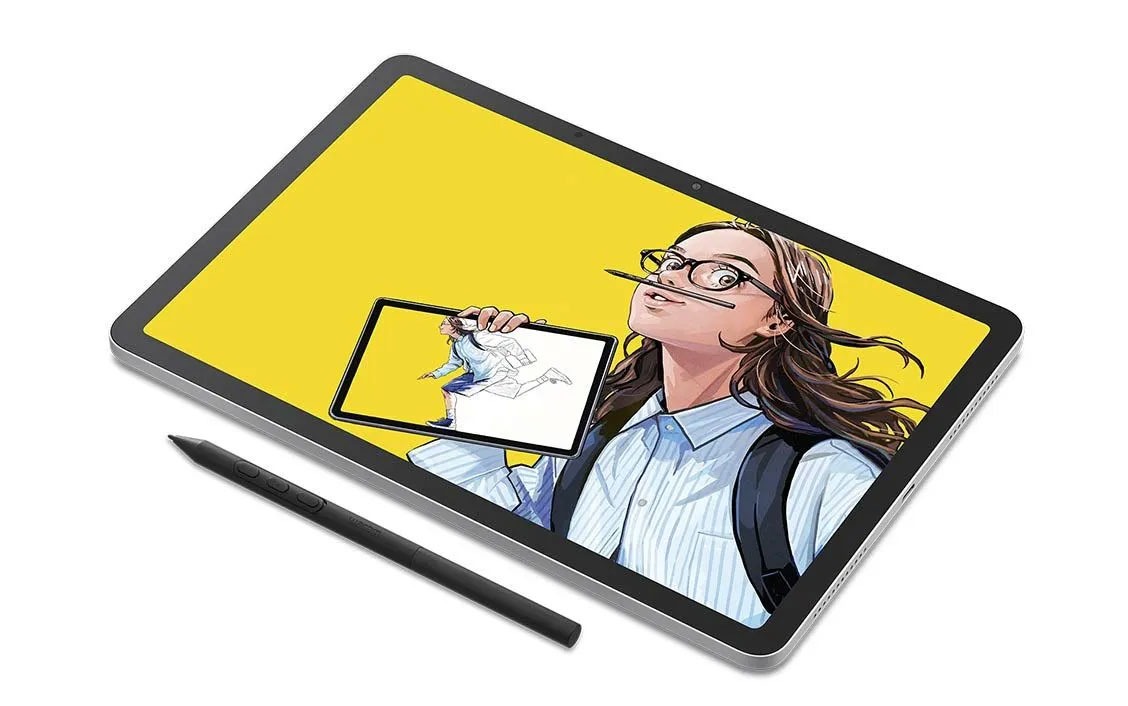
The MovinkPad 11 is the most recent entry in the standalone tablet category. A standalone is basically like a Galaxy Note or an iPad. It has its own operating system, memory and specs and doesn’t need to be plugged into your computer to work. It has its own apps and other software installed, and is generally much more convenient than a peripheral. As someone who once spent a lot of time drawing on an iPad, I was very curious about the MovinkPad 11. After some time with the device I can break down the pros and cons and let you know if this little tablet is right for you!
A MovinkPad 11 Basic Feature Breakdown
This little guy is trying to compete with iPads and Galay Notes specifically, but only for creatives. While it does cover many of the bases of a regular tablet, there are some details that make this thing a purely artist-focused device that isn’t really right for the regular tablet crowd.
Firstly, this thing has the tiniest little cameras I’ve seen in ages. In a tech world where everything has a massive array of multi-lens cameras, it’s almost refreshing to see something purposely built without them. You aren’t taking pictures with this thing, you’re making pictures with it. The most you should want to do with these things is scan a paper drawing or some reference into the memory.
It isn’t made from sleek brushed aluminum. When devices started making the metal housing standard, it felt nice and high-end. I’ve gotten so used to that by now, though, that this nice sturdy plastic tablet body actually feels refreshing. It also keeps the tablet light, weighing in at just 1.3lbs.
It has an etched glass textured screen. Most tablet users wouldn’t prefer this, as a textured screen does soften details and take away a bit of color vibrance when compared to gloss-glass screens, but for an artist, feeling the texture and resistance of pen-on-paper is a huge plus.
Here’s a direct breakdown of the specs for the MovinkPad 11
Display
- 11.45-inch screen
- 2200 x 1440 resolution
- 90Hz refresh rate (very little chance of lag between input and screen response)
- ~99% sRGB (this means the screen is extremely color accurate)
- Anti-glare etched glass
- Direct bonding to reduce parallax (the effect of the tip of the pen not lining up visually with the lines being drawn)
Performance & Hardware
- MediaTek Helio G99 processor
- 8GB RAM
- 128GB storage
- No microSD expansion
- Front camera (5M pixel) and rear camera (4.7M pixel)
- Dual microphones / Stereo speaker
Connectivity
- Wi-Fi
- Bluetooth 5.2
- USB-C
Dimensions & Weight
- Product dimensions: 10.5in x 7.2in x 0.3in
- 1.3lbs
What do all these specs mean for you? Well with programs like Clip Studio, Ibis Paint and Krita, performance will be smooth and worry-free and it can handle moderately large canvases without lagging. While extremely capable, the smaller memory means file storage will be something the industrious artist needs to be aware of, and extremely large high res files might not be easy to work with.
The Wacom Pro Pen 3
So I may have been burying the lead here because the Wacom Pro Pen 3 is widely considered one of the best digital pens on the market. It is generally only compatible with Wacom products though, so most avid tablet users don’t know the joys of working with it.
Why is it so good? Well for starters it is the most responsive battery free pens I’ve ever used. With 8,192 levels of pressure sensitivity, tilt support and a palm rejection system that’s nearly flawless, it’s just a joy to use. It’s not so slim that it’s hard for larger hands to hold, but not so big that those of use with smaller hands feel like we’re drawing with a tree branch. It’s just an all-around great tool!
What Daily Use Feels Like
The etched glass screen is really a big winner for me that I feel needs top billing in this section. The Pro Pen 3 slides across the matte surface smoothly with just enough resistance to feel like drawing on paper. It also reduced glare so even drawing in public under bright lights won’t make it hard to see your work. The suber thin glass and tight lamination also makes the accuracy of your pen tip on the screen feel fantastic. There is almost no parallax to be found here!
Even without the great glass screen it would still be a joy to work on as the good specs make for an easy, responsive lag-free drawing experience in the included and tablet-specific apps. The processor keeps up with the demands of the Pro Pen easily making curves feel natural and unsegmented, and the excellent palm rejection means no accidental blobs or lines get thrown around by your hand, which is important for a heavy-handed guy like me.
What Are The Downsides?
Well for starters, this is not a desktop replacement. While well made and fun to use, it’s not powerful enough to handle really big files or files with a ton of layers. It also can’t load full versions of Adobe programs like Photoshop. There’s also the fact that it is an Android tablet. There are some real showstopper apps that are designed specifically for the iPad and apps built for Android tend to be a tiny bit less deep and fleshed out that their Apple counterparts.
Another issue is the battery life. It’s fine at 7700mAh, but working on bigger files or in heavy apps does drain power quickly. I would recommend using it while plugged in when you can.
While this is true for most tablets, I think it bears mentioning here that it does not come with any kind of kick stand. Usually that’s not so bad for a tablet, but as this is an art tool, the inability to prop it up at a comfy angle without paying extra is a bit silly. It does have four nice grippy little bumps on the back to keep ti from sliding around though, so that’s something!
Who This Is and Isn’t Right For
It’s a good fit for:
- Illustrators
- Concept artists
- Students
- Hobbyists
- Artists who want portability
- Creators who sketch away from their desk
It is not ideal for:
- Full-time commercial retouching
- Heavy Photoshop workflows
- Large-scale production art studios
- Users needing expandable storage
Final Thoughts
While I may be a big time “work at your desk” sort of artist, I do really enjoy a good work outing and this tablet is going to be in my go-bag for the foreseeable future. It’s a capable, fully stand-alone Android tablet which means no messy cables and no bulky laptop. It’s easy to hold and carry and with an added stand, works great at a diner or lounge.
While not as powerful as an iPad, the $449.95 price tag more than makes up for that. Also, not having to charge my stylus is a huge plus. I’m forgetful and nothing hurts like getting to your destination and realizing your stylus is out of charge.
I give the Wacom MovinkPad 11 a big thumbs up!
Bio: Ever since George was disappointed with a toy that did match up to the advertising, he became a tireless advocate for consumers. He’ll review anything that folks have to spend their hard-earned dollars on. George is grateful that he gets to use his skills as a writer and an artist to help connect with consumers and help them make the best decisions possible.
This article is for informational purposes only and reflects the author’s independent opinion. Product features, specifications, pricing, and availability may change without notice. Readers should verify details directly with the manufacturer or retailer before making a purchase decision.