
If you’re like me and continuously take photos of every butterfly and every restaurant meal on your mobile device, than you also have digital storage issues.
Out of desperation to not pay for any additional cloud storage, I needed to find a reliable and convenient way to store my photo memories.
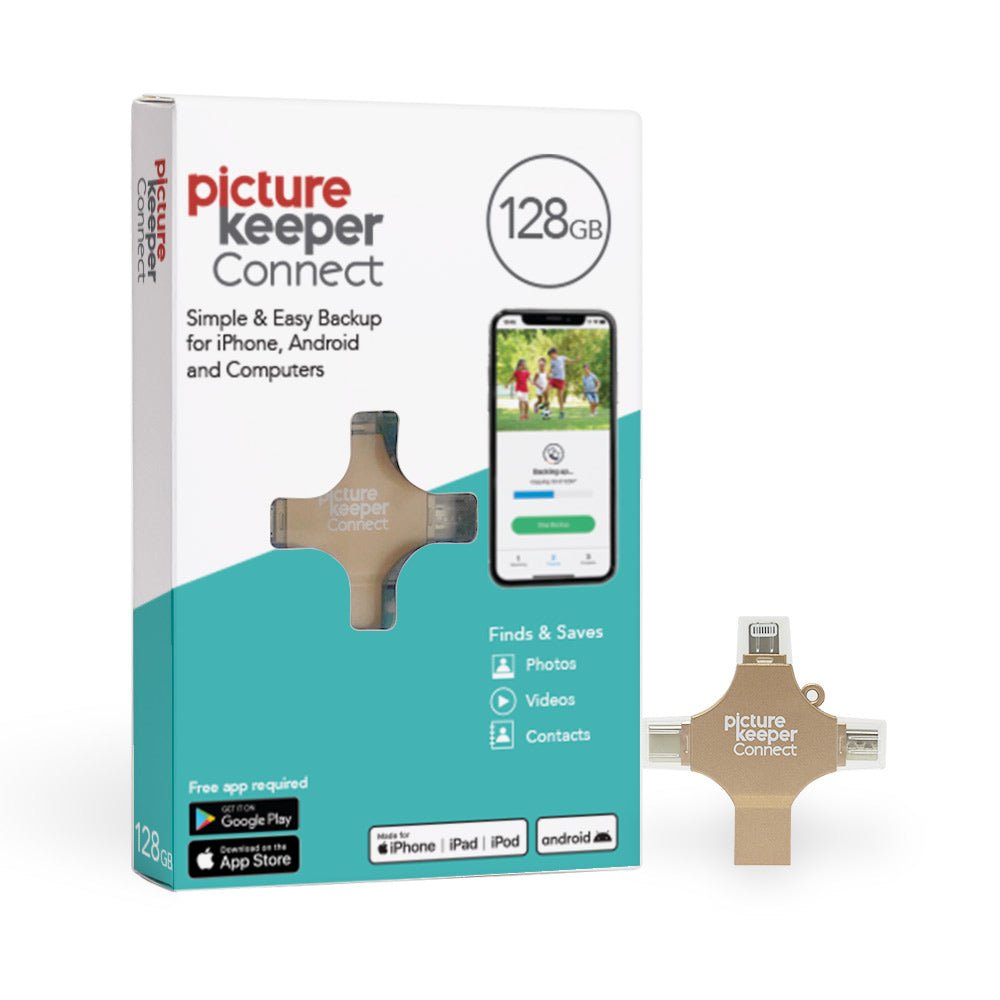
What is a Picture Keeper?
Picture Keeper is a USB backup and transfer device that allows you to store photos and videos without an internet connection. It also allows you to transfer files from the Picture Keeper to a computer or laptop by simply inserting it into a USB port.
I’m so glad that I found and bought the picture keeper on QVC. It not only saved us from continually seeing the “cloud storage almost full” warnings on our iPhones, but I’ve been very concerned lately about not having our priceless photos backed up on an external device. And when I bought it, the price was right. I paid $69.98 on QVC.com at a 41% savings off the regular QVC price of $120.00.
The Picture Keeper Connect comes in a variety of colors:
:: Berry
:: Gold
:: Gray
:: Pink
:: Turquoise
I selected the gold color to match the fact that our family photos and memories are valuable like gold. I also placed it in a safe, special drawer so the family can locate it, should they need to.
Holds Up To 32,000 Photos and Other Features
Not only does the 128GB Picture keeper hold up to 32,000 photos, but it also can store up to 2,240 videos. The storage space also allows you to back up contacts and other important documents. Of course, storage capacity depends on the resolution and file size.
The Picture Keeper Connect includes adapters for just about every device, so it can plug into an iPhone, Android, PC, or Mac. The Picture Keeper Connect USB device is specially designed to offer a “lightning” connector on one end, a USB Type-A plug on the other, and an adapter with USB Type-C and Micro-USB ports.
It’s so small that you can take it anywhere. For example, you can carry it to share with other family members or even take it when travelling to immediately transfer your travel photos to the Picture Keeper Connect.
The best part of owning a Picture Keeper Connect: No more relying on our cell phones, desktop computers, and laptops for storage. Costly limited storage options provided by tech companies are never enough to store our precious family photos.
Is it Hard to Use the Picture Keeper Connect?
It’s quick and easy to use! Simply download the Picture Keeper Connect mobile app, plug Picture Keeper into your device, and tap “Start Backup.” Yes, it’s that simple. The app is free on the Apple and Google Play Store and allows you to create backups.
You do not have to upload every photo. There’s a manual option to select and choose only the photos you’d like to transfer from your photo collection to the Picture Keeper Connect device. Keep in mind, manually selected individual photos will take more time than an automatic transfer of all photos.
Once you put your photos, videos, or documents on the Picture Keeper Connect, you can easily access and view them from any device. Here’s another great benefit: You can edit and customize your photos and videos in the app and use the erase tool to make photo retouches along with a variety of fun filter options.
Here is the complete list of steps to use a Picture Keeper Connect:
<1> Download the Picture Keeper app from the App Store or Google Play store.
<2> Connect your Picture Keeper to your device.
<3> Sign in to your account or create a new account.
<4> Once logged in, just click Start Backup and let Picture Keeper do the work.
<5> Upon completion, you’ll see all photos and videos backed up on the device.
<6> To view a specific photo or video, simply click it, and it opens in a preview window.
The process is quick, mere minutes, and securely backs up your photos so they’re ready to view whenever you want to. You can organize photos and videos by creating folders. To view your backed up photos on a different device or share with others, simply connect the Picture Keeper Connect and sign in to your account.
Specifications of the Picture Keeper Connect
One comment that is not mentioned as part of the specifications is that transferring photos, videos, and documents from your mobile device to the Picture Keeper Connect will drain the battery on your mobile device. My recommendation is that you keep your mobile device charging during the process.
Product specifications:
:: 128GB storage
:: Compatible with most Apple® and Android mobile devices, PC and Mac computers
:: For use with Picture Keeper Connect app
:: Type-C, Lightning, and micro-USB connectors
:: MFi certified to meet Apple performance standards
:: Measures 2.13″ x 2.06″ x 0.25″
:: Imported
Is the Picture Keeper Connect Right for You?
If you hate paying for iCloud or other cloud services, or you’re seeking a dependable backup solution for your digital media, the Picture Keeper may be the solution you’re looking for. With this device, you can ensure that your precious memories are safe and secure, and you don’t have to worry about running out of storage space on your phone. The fact that it’s so easy to use makes it the ideal device for anyone looking for reliable photo storage solution, even for those that are not tech-savvy.
Picture Keeper Connect makes a great gift for anyone that loves taking photos including:
:: Grandparents looking to back up ongoing family memories
:: New parents looking to store baby photos and thousands of photos to come
:: Teachers looking to chronicle class events during the school year
:: Pet parents that love to share photos on social media
:: Anyone looking for a way to store important business files and documents
:: Photographers and videographers who need to safeguard files
:: Travelers who continually need to free up storage space
If you’re looking to store more than 32,000 photos, you may want to consider purchasing the Picture Keeper Connect 256GB Storage Saver Device that holds 85,000 photos.
The Picture Keeper Connect Digital Storage Device – A Better Safe Than Sorry Solution
One of the biggest pros of this impressive device is that I no longer have to abruptly stop taking photos when traveling to delete photos to make digital space for new photos. That always seemed to happen at the most inopportune times … like when I was about to capture a dolphin leaping out of the ocean. Yes, missing that photo stung a bit.
I appreciate how easy it is to store this compact device. I also like that it is available in many colors. You can buy multiple Picture Keepers in various colors so you can color code by device such as holidays, vacations, school events, pets, important documents, and more.
When I completed downloading photos and videos from my iPhone, I let out a big sigh of relief. I slightly scolded myself for waiting so long to back up my family photos. The Picture Keeper Connect app makes organizing photos quick, simple, and easy. Just plug it in and click the “start backup” button.
The next time you’re running out of storage space on your mobile device, consider purchasing a Picture Keeper Connect. I’ve found the one-time purchase cost-effective … and I pay less for monthly cloud fees year after year. Remember, you can’t put a price tag on family memories and losing photos would be heartbreaking.