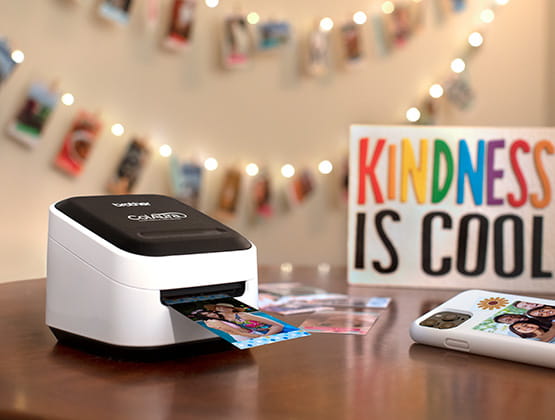

Print full-color labels out of photos from your mobile device WITHOUT INK! ColAura is a versatile, color photo and label printer ideal for craft projects and so much more.
Every Crafter’s Home Needs One
If you’re a crafter or you run a side business, you understand the importance of having separate devices and tools. You don’t want to use up all the color ink from the family’s printer to print business or craft-related labels. Then, when a family member needs to print out an important document, report, or school project, the printer is out of ink.
For me, this problem was solved with the purchase of the versatile Brother ColAura Color Photo and Label Printer. This was exactly what we needed in our home.
In Search of a Lightweight Craft Printer
First, let me admit that we own a Cricut Explore® 4. Next, I’ll tell you that I found the Cricut to be cumbersome and it weighs 11 pounds. I wanted a tiny, lightweight device that I could easily grab to print out quick photos and labels. The ColAura weighs a miniscule 1.45 pounds. I carry it around the house and use it in whichever room I need to.
The ColAura is a lightweight, compact printer that is WI-FI enabled, so you can print directly from your iOS® and Android™ smart devices. It’s so small that you can take it virtually anywhere you can access WI-FI. If someone asks you for a quick label or photo printout, the ColAura is ready for use. While I was reorganizing my food pantry, I printed out dozens of labels for storage containers. In fact, the Brother ColAura VC-500W can print full-color labels, photos, and stickers.
Includes Everything You Need to Get Started
When you open the box, you’ll find everything you need to print right away.
Here’s what’s in the box:
:: ColAura – Color Photo and Label Printer
:: 1 inch roll of Cassette CZ-1004, 16.4 ft. of paper
:: Cleaning roll, Cassette CK-1000 6.5 ft.
:: Power adapter
:: USB cable
:: Quick start guide
Versatile Printing For Unlimited Uses
With the Brother ColAura Color Photo and Label Printer, the possibilities are endless. You can print full color labels and photos up to 2″ wide and 17″ long, as it features a built-in cutter for custom length. Easily print from your photo gallery, camera apps, notes, or social media. It’s a fun and easy way to personalize and create handmade gifts, gift wrap, greeting cards, invitations, photo projects, party favors, stickers and other family fun items. It’s also good for organizing, scrapbooking, journaling, making address labels, and home decorations. Print full-color labels with photos for party or school name tags.
NO Ink Cartridges, Ribbons, or Toner Needed
The Brother ColAura Color Photo and Label Printer uses ZINK® Zero Ink® Technology and conveniently allows you to select from five label roll width options and print up to 17″ in a single pass from your photo gallery. With ZINK® Zero Ink technology, there’s never a need for ink cartridges, ribbons, or toner. The ZINK paper is water, tear, and smudge resistant and has an adhesive backing to make labels. The built-in, automatic cutter makes full or half cuts and prescores the sticker for ease of peeling. The durable adhesive label/sticker adheres to most surfaces.
If you’re wondering how the ZINK® Zero Ink technology works, the paper contains all the colors needed for high-quality photo printing. The special Brother Genuine CZ and CK rolls come in widths of 3/8″, 1/2″, 3/4″, 1″ and 2″ widths.
Print Directly From Smart Devices
Here’s the best part, the ColAura Color Photo and Label Printer is Wi-Fi enabled so you can print directly from your PC, Mac, Android, or iOS smart device when connected to a wireless network. It supports Apple® AirPrint® wireless printing technology apps, plus it’s compatible with Windows® (7 or later) and Mac OS®X (v10.11 or later). Since purchase, we have never experienced any issues connecting to Wi-Fi.
Mobile App Allows You To Design On-The-Go
The FREE Color Label Editor 2 App that is included with the Brother ColAura Color Photo and Label Printer can really take your craft projects to the next level. The app offers customizable features such as fonts, frames, artwork, symbols, backgrounds, and quick-start, ready-made designs. You can create festive invites or share your favorite photographs using the Photobooth template. With the Color Label Editor app, you can even use the Brother® ColAura Color Photo and Label Printer for a fun photobooth activity. And you can create keepsakes for special events.
FREE Downloadable Software
In addition to the Color Label Editor 2 App, you’ll also want to download the FREE P-touch Editor software to design and print professional-looking custom labels from your Windows or Mac® computer. The P-touch Editor software allows you to easily create special photos, artwork, and logos and then, print your masterpieces on the Brother ColAura Color Photo and Label Printer.
Ideal For Home Office and Small Business Uses
The ColAura Color Photo and Label Printer is a great tool for both home office and small business. You can use the customized labels for organizational tasks, business projects, personalized address labels, and more. You can also create name badges for business events, office visitors, or make labels for filing systems.
Compact, Lightweight and Reliable
The ColAura Color Photo and Label Printer is compact and takes up very little space. You can keep it with your craft supplies or perched on an office desk ready to be used. I like the fact that I don’t need to rely on my large desktop printer or use a third-party service to print out labels.
I also like that I’m not feeding an entire sheet of 30 labels into my traditional printer when all I need is one or two labels. With the ColAura Color Photo and Label Printer, I can reduce waste by printing single, pre-cut labels as needed. So far, the performance of the ColAura Color Photo and Label Printer has been reliable, and the quality of the labels that it produces has been great.
One note: While the ColAura Color Photo and Label Printer is a portable printer, it still needs electricity, so you’ll need to have an outlet to operate the machine.
Specifications of the Brother® ColAura Color Photo and Label Printer
:: Model #: VC500W
:: Dimensions: 4.4″ W x 3.8″ D x 4.6″ H
:: Unit Weight: 1.45 lbs.
:: Product color: Black and white
:: Label Rolls: Continuous
:: Max. Label Length: 17″
:: Max. Label Width: Approx. 2″ (1.97″)
:: Max. Print Width: Approx 2″ (1.97″)
:: Resolution (DPI): 313
:: Included Software: AirPrint®, Brother Color Label Editor, free app download for wireless printing from your Apple® or Android™ mobile device
:: Operating Systems: Mac OS X 10.11.x, Mac OS X 10.12.x, Mac OS X 10.13.x, Windows® 7, Windows® 8/8.1, Windows® 10
:: 1 Year Limited Warranty
Pros and Cons of the Brother® ColAura Color Photo and Label Printer
The ColAura Color Photo and Label Printer comes with a bit of a hefty price tag and the ZINK® Zero Ink® Technology photo paper costs more than standard label paper. However, you do save some money in the long run by creating cost-efficient, full-color stickers, greeting cards, invitations, handmade gifts, and more. The printer quality has also been impressive.
Pros:
:: Saves money on ink and toner costs
:: Easy to operate, wireless print from mobile devices
:: User-friendly apps and software allows extra features
:: Endless, versatile uses for labels, photos, and stickers
:: Fun way to customize gifts and party favors
:: Labels help with organizing food pantry, playroom, and office files
:: Allows for creative expression through unique designs
:: Lightweight, portable and compact for easy storage
Cons
:: Initial printer cost
:: Requires special ZINK® Zero Ink® Technology paper
Get Creative With ColAura Color Photo and Label Printer
The ColAura Color Photo and Label Printer has been a fantastic addition to our home. I selected it because of the compact size and the fact that it offers ZINK® Zero Ink® Technology, eliminating the hassle of empty ink cartridges. We enjoy creating labels and stickers for scrapbooking and making customized gifts and greeting cards.
While the initial purchase is high (around $200.00), in the long run, the label printer has been worth it. The ColAura Color Photo and Label Printer is a worthy investment for anyone looking to expand their craft projects and creativity. The FREE Color Label Editor 2 app offers thousands of decorative embellishments including cool frames, fancy fonts, artwork, backgrounds, and more.
I’m really impressed with this little printer. It’s lightweight, easy to set up, and the colorful printed images are lovely. Best of all, the printouts dry instantly so there is no smudging, and the labels stick well to surfaces. This trusted Brother® brand product has given me a level of versatility that I truly appreciate.