
Let me know if this sounds familiar: You have gotten a little tired of slower internet so you splurge on the faster package. Maybe you got 1 gig, 2 gig, even faster and boom, your wired devices like your computer or game console feel noticeably better. Then you pull out your phone and it feels like nothing has changed. You move into the next room of your house from the router and it gets even worse. You decide this is fine, but after a few days even your wired devices start to stutter. What on earth is going on with your connection? You bought the faster package, didn’t you? Well the problem isn’t with your internet speed, it’s the router that isn’t designed to handle that speed!
Upgrading to the Netgear Nighthawk RS300 changed that experience completely for me. The network on this router feels amazing through daily use, laptops, phones, handhelds and consoles all ticking along smoothly without interruption.
After using the RS300 as the primary router in a typical home environment with multiple active devices, here is what stood out, what improved immediately, and where it makes the biggest difference. What all this means is that for a price tag of $279.99, you’re getting a serious pro network experience without the insane cost.
Setup Was Simple And Did Not Require Technical Experience
The setup process was straightforward and did not require any advanced configuration. After connecting power and the internet cable, the router powered on quickly. Using the Netgear mobile app, the setup process guided everything step by step. The router was detected automatically, and creating the network name and password took only a few minutes.
Most devices reconnected automatically, and the few that needed manual reconnection did so without issue. The entire process, from opening the box to having a fully working network, took less than 20 minutes, and that’s in a home with way more devices running simultaneously than any single person has any business running.
The part of this whole ordeal I really want to stress is the app. As anyone who has moved their home over to a new router will attest, it’s usually a pretty frustrating process. Getting to your router’s IP page on a browser isn’t exactly easy for a lot of non-tech savvy folks, so being able to do all the setup through a sleek well designed app was a very nice change.
The Most Noticeable Improvement Was Stability
Speed increases are easy to measure, but stability is what actually improves daily use. With the RS300, connection interruptions became rare. The most common disconnect came from the service provider now, not the router. Devices stayed connected consistently, and performance remained steady even when multiple devices were active. The RS300 is rated for up to 100 concurrent device connections at once which is pretty amazing. Running all these devices without any signal interruption was been so nice.
Previously, streaming video while downloading files or participating in a video call sometimes caused slowdowns. After switching to this router, those situations no longer caused noticeable performance drops. The connection felt consistent instead of unpredictable. This made everyday tasks feel smoother and eliminated many of the small frustrations that had become routine with the previous router.
Coverage Was More Even Across The Entire Space
Signal strength improved in areas that previously had weaker connectivity. Rooms farther away from the router maintained stronger connections than before. Streaming video remained stable, and downloads completed without unexpected slowdowns. Instead of having excellent performance near the router and weaker performance elsewhere, the signal felt more balanced throughout the home.
This made it easier to use devices anywhere without needing to move closer to the router for reliable performance. Granted, I don’t live in a huge house, maybe 1200 square feet, so larger homes may still need a jumper or two, but this thing really punches that signal through a wall!
The Official Specs Are Impressive
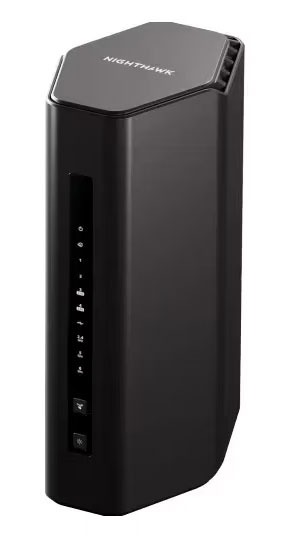
Talking about the feel of this thing is all well and good, but with a bit of tech like this that serves as the central hub for your entire home needs to be able to back up its claims on paper. For a relatively small device, about 10 inches by 4 inches, it has a lot of functionality packed inside. 4 Gigabit out ethernet ports means more hard-wired devices at once, and the USB port allows for direct input for more hardcore users. A secondary 2.4GHz and 5GHz band set allows for a separate WIFI signal for guests to connect to, which is always a nice plus.
This is a Wi-Fi 7 router which assures compatibility with the newest devices and assures future updates will keep it secure. It is also VPN compatible, the app helping make the addition of a router-side VPN simple which will greatly increase your entire home’s digital security.
Wired Connections Provided Excellent Performance
A lot of people only consider the impact on Wi-Fi performance when buying a router, but consider the importance of the devices you have hard wired into the thing. Some older and less engineered routers can lose a bit of data speed to the ethernet ports if the Wi-fi load is too strong but, in my experience, this little powerhouse never lets up on the dedicated outlets. I work from home and had the modem installed in my office when I moved in here since I knew I’d be at the desk poking away at this keyboard all day. Being plugged into the RS300 feels like I’m working on a supercomputer. Everything just flies and load times feel practically nonexistent where online connections are concerned!
All of this is because the router includes high speed Ethernet ports that support faster dedicated wired connections. Large files transferred quickly, and online applications responded immediately. Even though wireless performance was strong, having fast wired connections available was such a nice bonus. This was especially useful for devices that benefit from maximum performance and stability, your desktop computer being the most common benefactor.
The Router Remained Reliable Over Time
Reliability is one of the most important aspects of any network device. After extended use, the router continued to perform consistently. There was no need for frequent restarts, and performance remained stable over time.
The router powered on quickly and maintained consistent performance without requiring adjustments. While writing this review I ran a number of basic tests like renaming my network and testing the time it took to get my devices to re-recognize it, multiple restarts and long rest restarts (unplugging it for an hour or more and testing the reboot speed.) Everything ran smoothly and I didn’t encounter any problems. I am fairly tech savvy so I might not be the best baseline for all this, but the Nighthawk app makes it crazy easy for most users to manage your router and network so even if you don’t know how to browse to your IP to change your network name you’ll be perfectly prepared to run the RS300.
The Design Is Clean and Practical
The physical design is simple and unobtrusive. The router does not rely on large external antennas, which makes it easier to place on a desk or shelf without drawing attention. It fits naturally into a home environment without looking bulky or out of place. The design feels modern and functional rather than decorative. Anyone familiar with the Nighthawk line of routers might be a little put off by the lack of futuristic spaceship-like design with these new routers, but it’s a nice change to be able to put one of these somewhere out of the way.
Pros
- Excellent stability and consistent performance
- Strong wireless coverage
- Fast wireless and wired speeds
- Simple setup process using the app
- Reliable long term performance
Cons
- Higher cost compared to entry level routers
- Larger benefits depend on network usage
- Advanced features may not be necessary for minimal use
- Kinda plain looking for those of us trying to make a “cool setup.”
Long Term Experience
After using the RS300 consistently, the most important improvement was reliability. The network stopped being something that required attention. Devices stayed connected. Performance remained stable. Everyday use felt smooth. Instead of adjusting behavior to accommodate limitations, everything worked as expected. This reliability made a noticeable difference in daily use.
Final Thoughts
The Netgear Nighthawk RS300 provides meaningful improvements in stability, speed, and reliability. It simplifies everyday network use by eliminating slowdowns and interruptions. The setup process is simple, performance is consistent, and the router handles multiple devices easily.
For homes upgrading from older routers or supporting many connected devices, the improvement is clear. The network feels faster, more stable, and easier to rely on. Instead of dealing with limitations, the connection supports everyday tasks smoothly and consistently.